Model Context Inspector
From the same blog post, we can also inspect MCP metadata and tools interactively using Model Context Inspector.
Source post:
Run Inspector with npx
npx @modelcontextprotocol/inspector --startup-url "https://localhost:7145/mcp"
If local self-signed TLS gives issues in local dev, I used this temporary workaround:
$env:NODE_TLS_REJECT_UNAUTHORIZED=0
npx @modelcontextprotocol/inspector --startup-url "https://localhost:7145/mcp"
Inside Inspector, use:
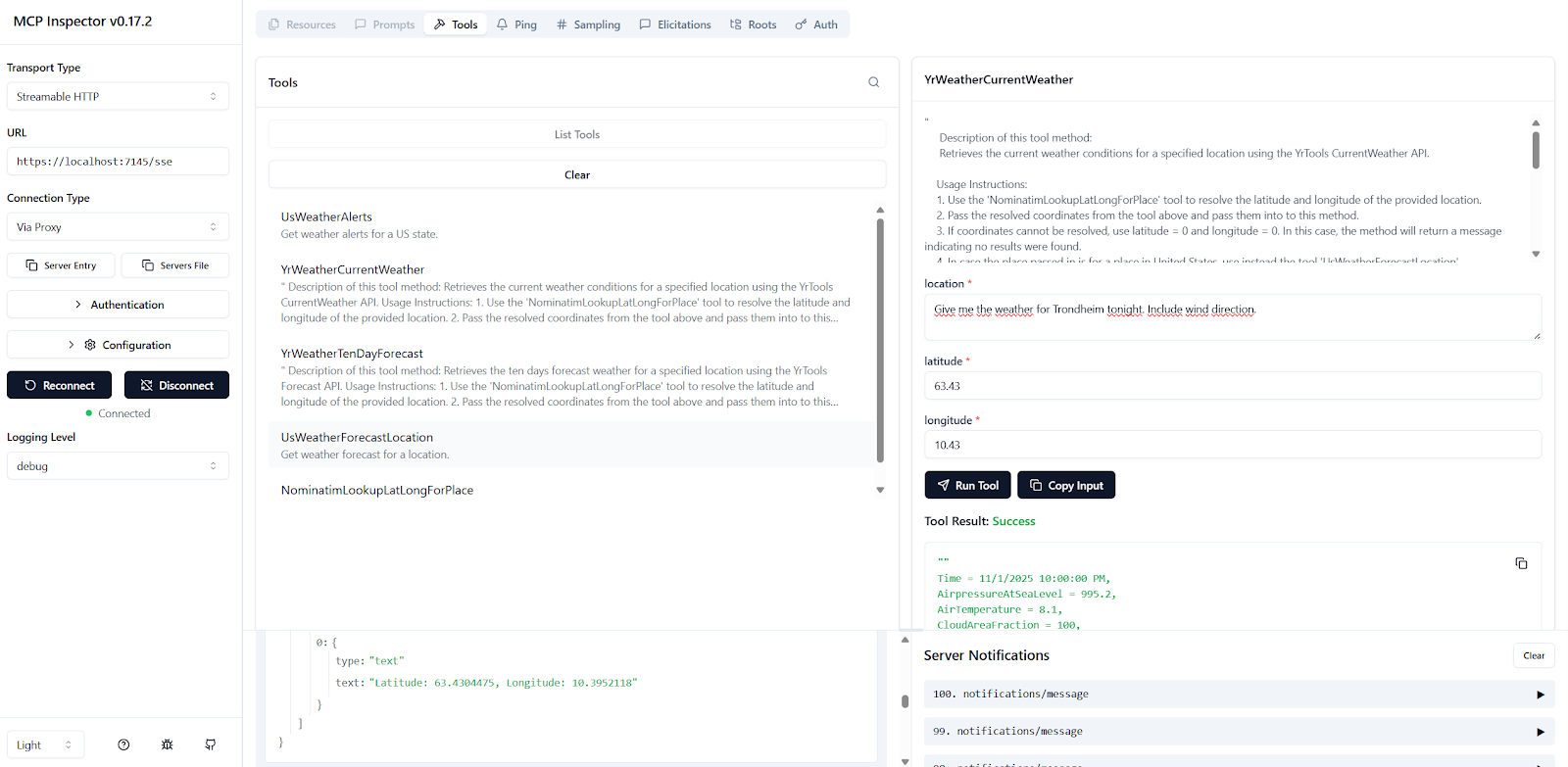
- Transport Type: Streamable HTTP
- URL:
https://localhost:7145/mcp - Connection Type: Via Proxy
The MCP endpoint on server side is:
app.MapMcp("/mcp"); // This exposes the SSE endpoint at /sse
Screenshot
Model Context Inspector in use:
Key notes (from the blog post)
- Add Swagger and Swagger UI on server side and expose an endpoint that lists JSON-RPC metadata for tools (and optionally prompts/resources).
- Use Model Context Inspector to inspect server capabilities and run tools without going through a chat client.